S91BOX Luxury Brands Lucky Draw
- 1. What Is S91BOX Luxury Brands Lucky Draw?
- 2. Explore Luxury Brands Lucky Draw Collections
- 3. Types of Luxury Brands Lucky Draws
- 4. How the Luxury Brands Lucky Draw Works
- 5. Luxury Brands Draw Results and Categories
- 6. Check Luxury Brands Draw History
- 7. Review Draw Statistics
- 8. Payment for Luxury Brands Lucky Draw
- 9. S91BOX Luxury Brands FAQ
What Is S91BOX Luxury Brands Lucky Draw?
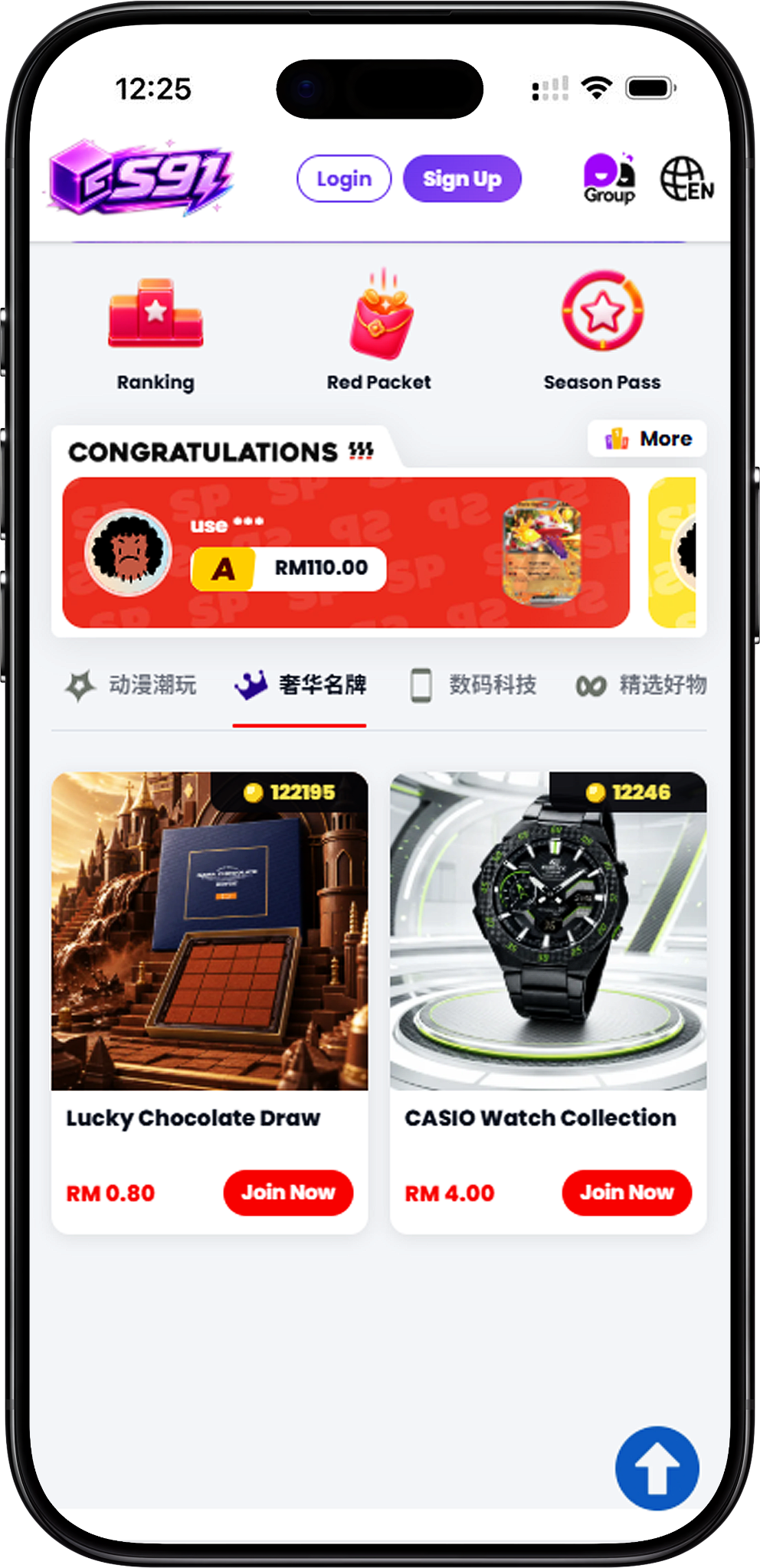
S91BOX Luxury Brands Lucky Draw is a Lucky Draw category featuring selections from different premium product themes. Instead of focusing on one product type, the category covers chocolate, watches, luxury scents and smartphones, allowing users to browse several types of featured collections from the same section.
Premium Product Collections in One Category
Each Lucky Draw is presented as a separate collection with its own theme and displayed entry price. Users can browse the available choices and select Join Now to enter the collection they want to explore.
Explore Luxury Brands Lucky Draw Collections
Complete Luxury Brands Lucky Draw Selection
The complete Luxury Brands Lucky Draw selection shown on S91BOX includes Lucky Chocolate Draw, CASIO Watch Collection, Luxury Scents Collection, and Apple Lab iPhone Collection. These four draws cover different product categories, from chocolates and watches to fragrances and Apple smartphones.
Choose a Luxury Brands Collection
Users can compare the four available collections directly from the Luxury Brands category before choosing one. Each collection card displays its name, entry price and Join Now option for accessing the corresponding Lucky Draw.
Types of Luxury Brands Lucky Draws
Lucky Chocolate Draw
Lucky Chocolate Draw focuses on chocolate products. The provided draw screen shows featured items such as (AJ)ROYCE’ Nama Chocolate, (AJ)ROYCE’ Bar Chocolate – Almond and (AJ)Beryl’s Twin Towers Milk Can Almond Milk Chocolate (150g), with individual displayed product values.
CASIO Watch Collection
CASIO Watch Collection provides the watch-focused option within the Luxury Brands category. Users interested in this collection can select its Join Now button to access the corresponding Lucky Draw.
Luxury Scents Collection
Luxury Scents Collection is the fragrance-focused selection in this category, providing a dedicated option for users who want to explore scent-related products through S91BOX Lucky Draw.
Apple Lab iPhone Collection
Apple Lab iPhone Collection represents the smartphone category, providing an iPhone-focused Lucky Draw alongside the other premium product collections available in Luxury Brands.
How the Luxury Brands Lucky Draw Works
Step 1 – Choose a Luxury Brands Collection
Browse the four Luxury Brands collections and select Join Now for the Lucky Draw you want to explore.
Step 2 – Review Featured Items
After entering a draw, review the featured products shown on the page. Individual items can display their product name and value, helping users understand what is presented within the selected collection.
Step 3 – Check the Current Draw
Review the current draw number and the result information displayed on the Lucky Draw interface before making a selection.
Step 4 – Select the Number of Draws
Choose from the available draw quantities. The provided interface displays Draw 1, Draw 3, Draw 5 and Draw 10, allowing users to select how many draws they want before proceeding.
Step 5 – Review and Confirm Payment
The Confirm Payment screen shows the selected draw total and available payment information. Review these details before selecting Pay Now to continue.
Luxury Brands Draw Results and Categories
SP, A, B and C Categories
The provided S91BOX Luxury Brands Lucky Draw interface displays four result categories: SP, A, B and C. The active draw page shows a percentage beside each category, allowing users to review the displayed distribution before participating.
Current Draw Number
Each round is identified by a visible draw number. This helps users distinguish the current round and compare it with records available through the History section.
Result Notifications
After a result is generated, the interface can display a notification showing the result information and its category. The current draw page also keeps the category information visible for reference.
Check Luxury Brands Draw History
View All Previous Results
Select History to access previous Lucky Draw records. The All view displays entries with information such as user, date and time, amount, draw number and result category.
Review SP History
Select the SP filter to focus on previous SP results. The displayed records can include the associated item image, amount and draw number, making it easier to review past SP outcomes separately.
Review A History
The A filter provides a dedicated view of previous A-category results. Each listed record can show its user, amount, associated item and draw number.
Track Draws Without SP and A
The History panel displays counters for draws without SP and draws without A. These counters provide additional historical context for the selected Lucky Draw.
Review Draw Statistics
Check SP Draw Statistics
The statistics view provides additional information for SP results, including a displayed SP percentage and the Last 20 SP Avg measured in draws. A visual chart shows previous result intervals for comparison.
Compare Historical Draw Intervals
Historical intervals are presented visually within the statistics panel, allowing users to review the number of draws associated with previous results. This provides another way to inspect past Lucky Draw activity alongside the standard History records.
Switch Between SP and A Statistics
The statistics interface provides SP and A options, allowing users to switch between the available historical category views when reviewing draw statistics.
Payment for Luxury Brands Lucky Draw
Review Wallet Balance
The Confirm Payment screen displays the user’s Wallet Balance before payment. A Top Up option is also available from this screen when additional balance is required.
Pay with Balance
Pay with Balance is displayed as a payment option. Users can review the selected method before completing their Lucky Draw payment.
Check Available Vouchers
A Vouchers section is included in the payment interface, allowing users to check whether a voucher is available for the transaction.
Confirm the Draw Total
The payment screen displays the total amount for the selected number of draws. Users can verify the total, payment method and available voucher information before selecting Pay Now.
S91BOX Luxury Brands FAQ
What is S91BOX Luxury Brands?
S91BOX Luxury Brands is a Lucky Draw category covering premium-themed products across chocolate, watches, fragrances and smartphones.
Which Luxury Brands Lucky Draws are available?
The complete selection shown consists of Lucky Chocolate Draw, CASIO Watch Collection, Luxury Scents Collection and Apple Lab iPhone Collection.
How many Luxury Brands Lucky Draw collections are available?
There are four Luxury Brands Lucky Draw collections shown, with each collection representing a different product theme.
What draw quantities can I select?
The provided Lucky Draw interface displays Draw 1, Draw 3, Draw 5 and Draw 10 as selectable draw quantities.
What are SP, A, B and C?
SP, A, B and C are the result categories displayed on the provided S91BOX Lucky Draw interface. A percentage for each category is shown on the active draw page.
Can I check previous Luxury Brands Lucky Draw results?
Yes. The History feature displays previous draw records, while dedicated filters allow users to review SP and A results separately.
Can I view draw statistics?
Yes. The History interface includes a statistics view with information such as the displayed category percentage, recent average draw interval and historical result intervals.
Can I check the payment total before paying?
Yes. The Confirm Payment screen displays the total draw amount together with Wallet Balance, Pay with Balance and voucher information before the payment is submitted.
Explore S91BOX Luxury Brands
Browse chocolate, watch, luxury scent and iPhone Lucky Draw collections, review the available draw information and choose the collection you want to explore.