S91BOX Top Up
How to Top Up on S91BOX
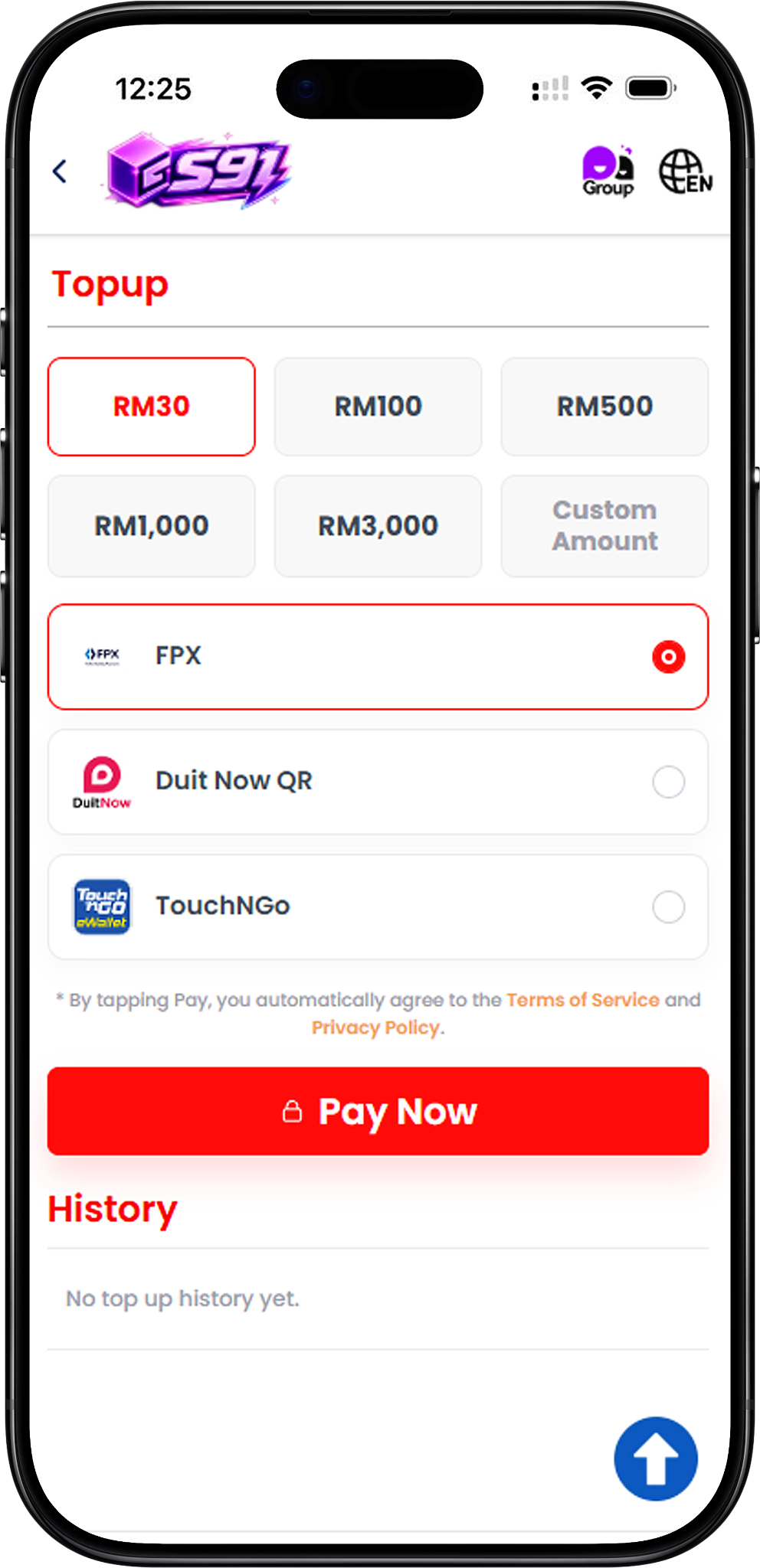
Step 1 – Open Top Up
Go to the Top Up section in S91BOX to access the available amount and payment options.
Step 2 – Select Your Top Up Amount
Choose RM30, RM100, RM500, RM1,000 or RM3,000 from the preset options. A Custom Amount option is also available when you need to enter another amount.
Step 3 – Choose a Payment Method
Select one of the available payment methods shown on the Top Up page: FPX, DuitNow QR or Touch ’n Go.
Step 4 – Tap Pay Now
Review your selected amount and payment method, then tap Pay Now to continue to the relevant payment process. By tapping Pay, users also agree to the applicable Terms of Service and Privacy Policy displayed on the page.
Step 5 – Complete the Payment
Follow the instructions provided by the selected payment method. The payment flow differs depending on whether you choose FPX, DuitNow QR or Touch ’n Go.
S91BOX Top Up with FPX
Step 1 – Select FPX
On the S91BOX Top Up page, select your preferred amount, choose FPX, and tap Pay Now.
Step 2 – Continue to the FPX Payment Page
The payment page displays the deposit amount, reference number and transaction time before allowing you to choose an online banking option.
Step 3 – Select Your Online Bank
Choose one of the available banks displayed on the payment page. The provided payment screen includes Maybank, RHB Bank, Public Bank, AmBank, Hong Leong Bank, CIMB Bank, Affin Bank and Bank Simpanan Nasional.
Step 4 – Complete Online Banking Authorization
Continue through your selected bank and complete the required online payment authorization. Ensure your bank account has been activated for online payment processing.
Step 5 – Wait for the Payment Result
Follow the payment flow through Login, Authorization and Result. Avoid repeatedly clicking the submit button or refreshing the browser while the transaction is being processed. Keep the displayed reference number in case it is needed for customer service assistance.
S91BOX Top Up with DuitNow QR
Step 1 – Select DuitNow QR
Choose your Top Up amount, select DuitNow QR as the payment method and tap Pay Now to proceed.
Step 2 – Open the DuitNow QR Payment
A DuitNow QR payment page will display a QR code together with the reference number, order amount and amount to pay.
Step 3 – Scan the QR Code
Use a supported payment app to scan the displayed DuitNow QR code and make the payment for the exact amount shown on the payment page.
Step 4 – Complete the Payment Before the QR Expires
Complete the payment while the QR code remains valid. The payment screen includes an expiry countdown, so do not proceed if the QR code or order has already expired.
Step 5 – Do Not Reuse or Refresh the QR Payment
The displayed payment instructions state that the QR code should only be scanned and paid once. Do not reuse the QR code, click back or refresh the payment page while completing the transaction.
S91BOX Top Up with Touch ’n Go
Step 1 – Select Touch ’n Go
Select your preferred Top Up amount, choose Touch ’n Go on the S91BOX payment selection screen and tap Pay Now.
Step 2 – Select E-Wallet
On the payment page, choose the E-Wallet payment method and open the available e-wallet selection.
Step 3 – Choose Touch ’n Go
Select Touch ’n Go from the e-wallet options. The page displays your payment amount and order information before you continue.
Step 4 – Pay the Displayed Amount
Tap the payment button showing the required MYR amount and follow the Touch ’n Go payment process to complete the Top Up.
S91BOX Top Up Amounts
Preset Top Up Options
S91BOX provides preset Top Up selections of RM30, RM100, RM500, RM1,000 and RM3,000, allowing users to quickly choose an amount before selecting their payment method.
Custom Amount
A Custom Amount option is also displayed on the Top Up page for users who want to enter an amount other than the available preset selections.
Check Your Top Up History
Review Previous Top Up Activity
The History section on the Top Up page is used to display previous Top Up activity. If no transactions have been recorded, the page shows “No top up history yet.”
S91BOX Top Up FAQ
What payment methods are available for S91BOX Top Up?
The S91BOX Top Up page provides FPX, DuitNow QR and Touch ’n Go payment options.
What preset Top Up amounts are available?
The displayed preset amounts are RM30, RM100, RM500, RM1,000 and RM3,000.
Can I enter my own Top Up amount?
Yes. The Top Up interface includes a Custom Amount option in addition to the preset amounts.
How do I Top Up with FPX?
Select FPX, tap Pay Now, choose an available online bank on the payment page and complete the required banking authorization.
Which banks are shown for FPX?
The provided FPX payment screen shows Maybank, RHB Bank, Public Bank, AmBank, Hong Leong Bank, CIMB Bank, Affin Bank and Bank Simpanan Nasional.
How does DuitNow QR Top Up work?
Select DuitNow QR, continue to the payment page and scan the generated QR code to pay the exact amount displayed before the QR expires.
Can I scan the same DuitNow QR more than once?
No. The displayed payment instructions state that the QR code should only be scanned and paid once and should not be reused.
Can I Top Up with Touch ’n Go?
Yes. Select Touch ’n Go from the S91BOX Top Up page, continue to the e-wallet payment screen, choose Touch ’n Go and complete the displayed payment amount.
Where can I check my previous Top Ups?
Previous Top Up activity can be reviewed in the History section of the Top Up page.
Top Up Your S91BOX Account
Choose your preferred amount and continue with FPX, DuitNow QR or Touch ’n Go to complete your S91BOX Top Up.